You no longer want to use CouponCrowd and would like to delete your user account along with all associated data? CouponCrowd offers you a simple option to do this directly in the app. Just log in with your account in the app and tap on the user profile icon, navigate to “Edit profile page” and click “DELETE ACCOUNT” button. Once you confirm the deletion request, your account will be immediately removed and all of your user data will be deleted from our database.
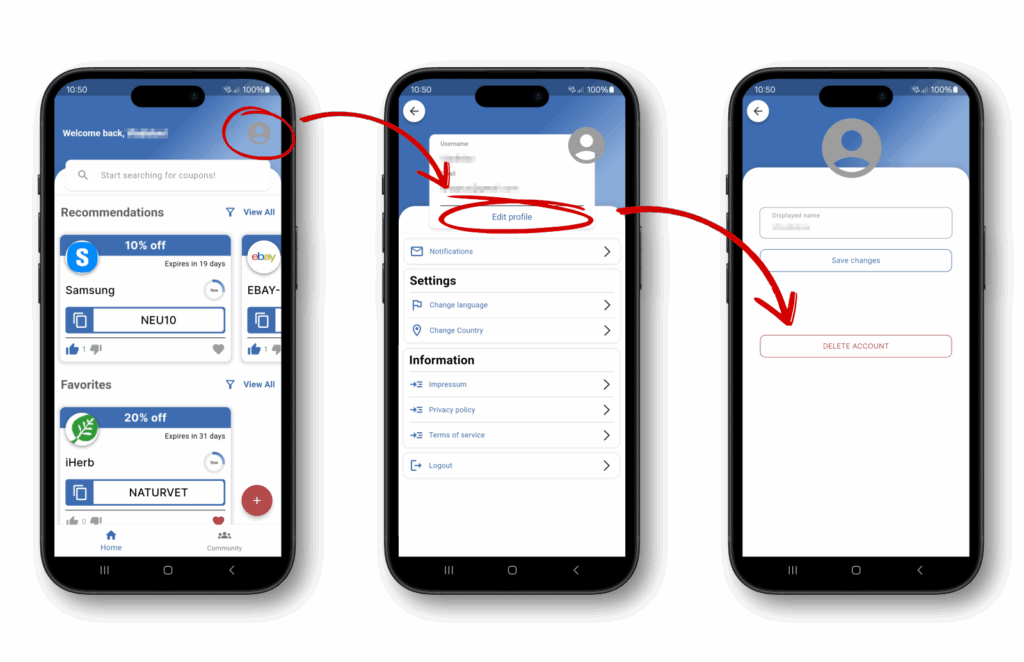
Have you already uninstalled the app or are you looking for another way to delete your user account? In this case, please contact us directly at our service address (Email: team@couponcrowd.app). Please use the subject line “Account Deletion” and send the email from the address linked to the account you want deleted. After verifying your request, we will initiate the deletion of your account.
We use cookies to improve your experience on our site. By using our site, you consent to cookies.
Manage your cookie preferences below:
Essential cookies enable basic functions and are necessary for the proper function of the website.
Google Tag Manager simplifies the management of marketing tags on your website without code changes.
Statistics cookies collect information anonymously. This information helps us understand how visitors use our website.
Google Analytics is a powerful tool that tracks and analyzes website traffic for informed marketing decisions.
Service URL: policies.google.com (opens in a new window)
Marketing cookies are used to follow visitors to websites. The intention is to show ads that are relevant and engaging to the individual user.
TikTok Pixel tracking